Open topic with navigation
Activating multiple licenses
You will need to have Double-Take installed on multiple servers, then you can activate the licenses on those servers all at once.
- On the Manage Servers page, verify that all of the Double-Take servers that you want to activate have been added to your Double-Take Console. See Adding servers.
- Select Go, Manage License Inventory.
-
Click Activate in the toolbar.
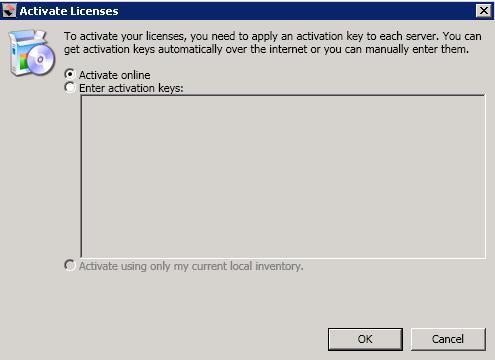
- Activate online—Select this option on an Internet connected machine to contact the Vision Solutions activation web site to automatically activate all of the licenses in your license inventory. This process will also deactivate any licenses that have been uninstalled through the Double-Take Console. You will not be able to activate a license that has already been activated but has not been deactivated. In that case, you will be prompted to complete a host transfer. Ideally, you should deactivate the license instead of doing a host transfer. See Deactivating licenses for more details. If you must do a host transfer, you will have to export your license inventory to a file, upload that file to https://activate.doubletake.com/hosttransferfile.aspx, and then import the file you get back. See Managing the Double-Take license inventory for details on exporting and importing a license inventory file.
- Enter activation keys—Select this option on a non-Internet connected machine to manually enter activation keys. You can obtain these keys from https://activate.doubletake.com by entering the server information for each server manually or by uploading an export file of your license inventory. See Activating a single license for details on gathering the server information or Managing the Double-Take license inventory for details on creating an export file.
- Activate using only my current local inventory—Select this option to activate all of the licenses in your inventory based on the inventory's current local settings. This process will also deactivate any licenses that have been uninstalled through the Double-Take Console. For example, if a server was offline when you performed activate online, you can perform the activation process again when the server is available. You may also need to perform this option if you selected not to activate the servers when you imported a license inventory file.
- Click OK to begin the activation process.
After your servers have been activated, you will have permanent codes that are specific to each server. They cannot be used on any other server. If the activated code and server do not match, Double-Take will not run.
If your activation codes needs to be activated, you will have 14 days to do so.
If you need to rename a server that already has a Double-Take license applied to it, you should deactivate that license before changing the server name. That includes rebuilding a server or changing the case (capitalization) of the server name (upper or lower case or any combination of case). See Deactivating licenses. If you have already rebuilt the server or changed the server name or case, you will have to perform a host-transfer to continue using that license.